On this page
What does the Name Tag do?
The NameTag is a pet-renaming item. In a player recording, the confirmation dialog asks whether to give a pet the entered name and warns that this uses the Name Tag.[4]
This guide covers that in-game pet item. Your Roblox username and display name are managed separately through Roblox’s account settings.
Getting a Name Tag: availability and price
Open the official Ride A Pet experience and check its current item descriptions. A reliable current shop location, price and purchase requirement have not been confirmed by the sources below.[3]
A third-party update guide mentions an Ethereal Name Tag and describes an out-of-stock listing in its update screenshot. That report is a reason to check the exact item name and current availability in your own server.[2]
- Look for the Name Tag item, then read its exact label and description.
- Check the displayed price, currency and stock before buying.
- Look for purchase requirements and any warning about the item being used up.
Before you confirm a pet rename
Player footage shows the hotbar item and final naming confirmation. The checks below help you avoid spending a tag on the wrong name. The intermediate controls have not been verified, so follow your current game prompts.[1][4]
Check the selected item
If you have a NameTag in your hotbar, select it and follow the game’s rename prompts.
Check the intended pet
Before proceeding, make sure the rename prompt applies to the pet you want to change.
Review the proposed name
Follow the current name-entry prompt and any validation message. Check the spelling of the proposed name.
Check the name, then confirm
The dialog asks whether to name your pet using the text you entered. Confirm uses your Name Tag. Choose Cancel to back out.[4]
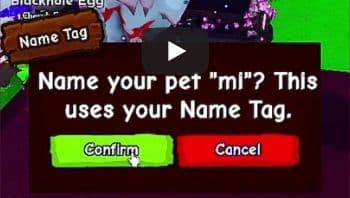
Reviewed October 5, 2026.
The recorded confirmation shows the proposed name and item-use warning. Button positions and controls may change with an update; follow the prompts in your current game version.
What to check before you use it
The confirmation prompt makes the item-use warning clear. Check the other details in your current game version before buying or renaming.
| Price and currency | Check the current item listing before purchasing. |
|---|---|
| Name length and characters | Follow any limit or validation message displayed in the name-entry field. |
| Item consumption | The confirmation prompt says “This uses your Name Tag.” Treat confirming the rename as spending a tag.[4] |
| Stock and restocking | An October 3 update report describes an out-of-stock listing. A reliable restock schedule has not been confirmed.[2] |
Can’t find it or change the name?
The tag isn’t available
Check the exact item name and any stock message. The October 3 report describes one out-of-stock listing; it does not establish current availability or a guaranteed restock time.[2]
Your name is rejected
Read the error message. If the game asks for fewer characters or different text, revise the name to match that instruction. Try a short, plain name such as “Mochi” rather than guessing an unsupported character limit.
You aren’t sure which pet will change
Stop before confirming. Check the pet shown in the rename view and the name you entered. Choose Cancel if the confirmation does not show the name you want; confirming uses your Name Tag.[4]
A few names for your pet
Keep it easy to recognize. Here are six short ideas to try once you have checked the game’s naming rules.
- Mochi
- Pebble
- Maple
- Orbit
- Clover
- Biscuit
These are suggestions. Acceptance by Ride a Pet has not been checked.
Frequently asked questions
What is the Name Tag for in Ride a Pet?
A player video shows the NameTag being used to rename a pet. Watch the short demonstration and review the confirmation screenshot above.
Is the Name Tag the same as my Roblox display name?
No. This guide covers the pet-renaming item shown inside Ride a Pet. Your Roblox account name is a separate account setting.
Where can I buy a Name Tag?
A current purchase location and price have not been confirmed. Check the exact item listing inside the official Ride A Pet experience before buying.
Does renaming use up the Name Tag?
The in-game confirmation warns, “This uses your Name Tag.” Treat confirmation as spending a tag, and check the name carefully before choosing Confirm. Do not assume one tag allows unlimited renaming.
Why is the Ethereal Name Tag out of stock?
A third-party update guide describes an out-of-stock listing in its update screenshot. It does not establish the stock state of every server or a guaranteed restock time. Check the current in-game listing.
Sources and further reading
The player clip shows the item in use; the official game page identifies the experience. The update report is secondary coverage, so treat stock claims as time-sensitive.
- Player demonstration: using a Name Tag in Ride a Pet ↗
Short player demonstration. The visible hotbar item was reviewed; the full intermediate sequence was not verified frame by frame.
Player video · DanoNano · YouTube - Ride a Pet Fuse Machine update coverage ↗
October 3 coverage mentions the Ethereal Name Tag and describes an out-of-stock listing in its update screenshot.
Third-party report · GameStratWiki - Ride A Pet on Roblox ↗
The official experience page identifies the game; it does not establish every item rule.
Official experience · Roblox - Player video: the Name Tag confirmation dialog ↗
Shows Confirm and Cancel controls and the warning that the rename uses your Name Tag.
Player video · Khunmi Ch. · YouTube Shorts
Reviewed on October 5, 2026. If an update changes these details, follow the current in-game description. Send a correction.